PRELIMINARY DRAFT - for internal VAS use only
See DairyComp 305 Online Help to view the production help build.
Connection Status
Connection Status allows you to quickly see if your DC305 integrations are communicating and properly transferring data with DC305. Connection Status runs in the background, essentially watching for connection failures and notifying you when they occur.
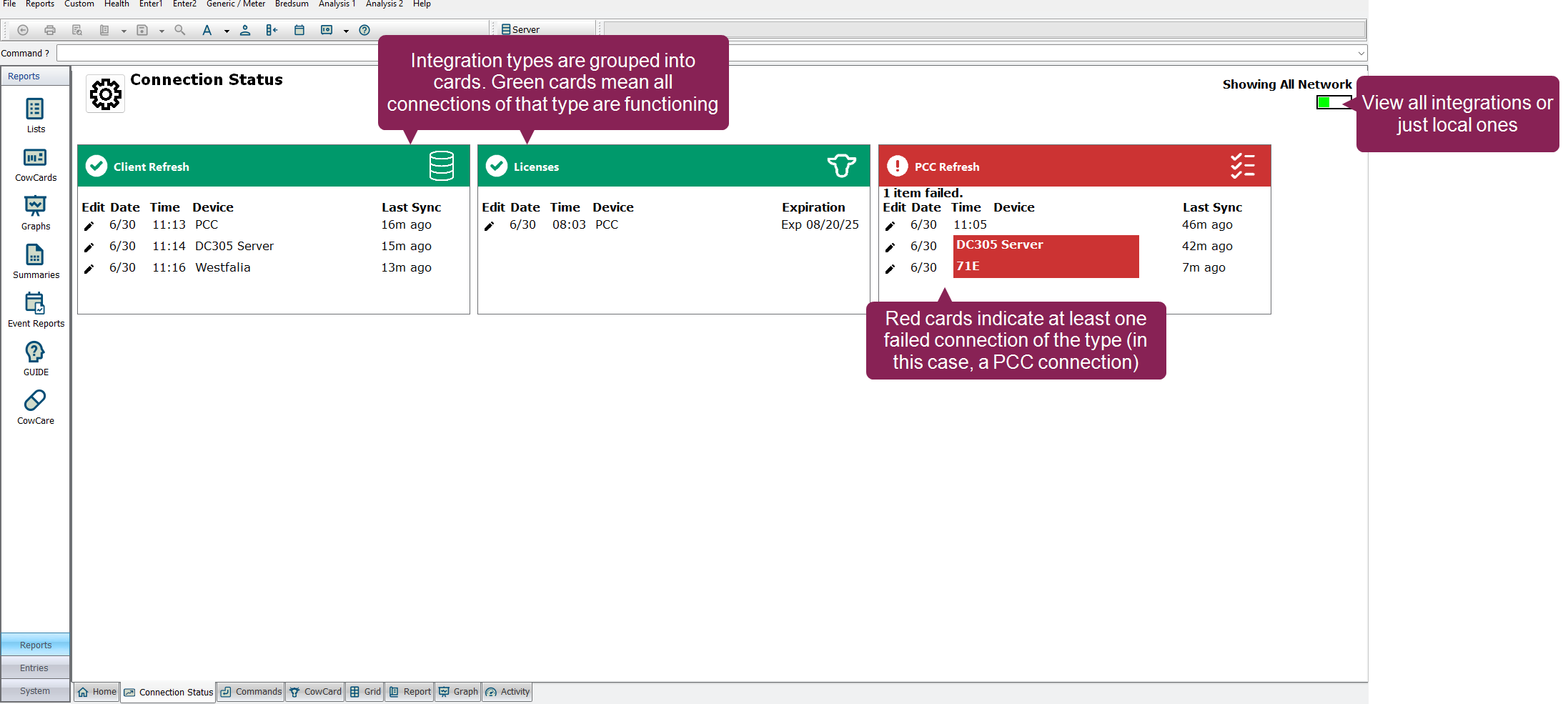
Integrations (such as ParlorBoss, Pocket CowCard, and more) show as cards on the Connection Status dashboard. You can configure the dashboard to show only the cards (i.e., integrations) you want. Each card contains information about the connections for that integration. An integration can have one or multiple connections associated with it.
The following information is displayed for each connection:
-
The date and time of the last connection check-in
-
The name of the device (which is user-configurable)
-
The number of days, hours, and minutes since the last connection check-in (i.e., the "Last Sync")
-
For Licenses, the expiration date
When a card is green, all of the connections associated with that integration are connected properly with DC305. When a card is red, at least one connection for that integration has failed.
 Types of Integrations
Connection Status allows you to monitor the following types of integration connections:
-
Client Refresh: Last refreshes from DC305 client machines to the DC305 server.
-
PCC Refresh: Last refreshes of Pocket CowCard devices to the DC305 server.
-
Integration Imports: Last data received successfully by the MILK command.
-
Integration Exports: Last data sent successfully by the MSEND command.
-
Backup: Last backup of DC305 data to your local machine (if configured) or to VAS.
-
ParlorBoss: Refreshes and imports of transactions from ParlorBoss.
-
VAS PULSE Sync: Last data received from VAS PULSE.
-
Licenses: Impending expirations for DC305 and PCC).
Showing All or Local Connections
The Connection Status dashboard allows to you view all your connections, or just those local to your machine. To do so, click the switch at the top right of the dashboard to toggle between the following choices:
-
Showing All Network: Displays the status of all connections across the entire DairyComp network, including connections on other clients and servers. This provides a comprehensive, system-wide view.
-
Showing Local Client: Displays the status of only the connections that are local to the client you are currently viewing the dashboard on. This view is useful for troubleshooting issues specific to your local machine.
See the topics below to learn more: